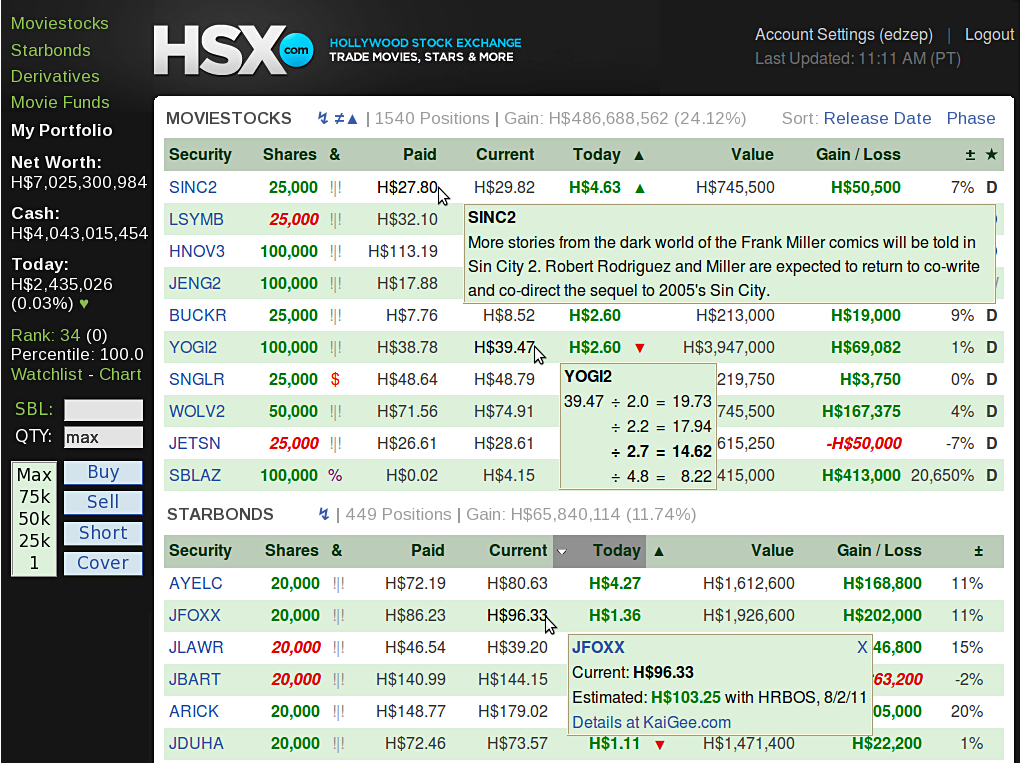
After the Hollywood Stock Exchange was redesigned in 2009, I lobbied for HSX to provide the same logical and functional portfolio features that we had enjoyed for most of 10 years. I finally realized I could provide them myself, using Greasemonkey. I have enjoyed some features of the latest HSX port redesign, such as the sortable columns and mostly improved page loading times. But, the view was cluttered, and making more than a few casual trades had become a slog, at best.
Port Monkey brings back the joy of playing on HSX. I hope it may also serve as a constructive basis for discussion of potential changes to the portfolio design.
Before I get to the goodies, I must recap the biggest impediments to trading, which have been noted on the HSX Feedback and Support Board, by myself and others.
Port Monkey features
Cleaner appearance - The number of shares are shown in green or red, to indicate long or short. Insignificant decimal places, arrows and parentheses have been removed. Column headings have been shortened so they don't wrap to a second line. Fidgety trade buttons have been removed. Clutter at the top has been removed, making a lot of data immediately visible.
Efficient and available trade tools - The My Portfolio panel is permanently locked in place. It contains key port info, links, and the trade tools. The Symbol box is automatically filled as the mouse pointer moves over tickers in the Security column. There's a quick-pick Quantity selector with customizable amounts. Empty Quantity is treated as 'max'. Trades do not take you away from the portfolio; trade confirmation appears as a popup window that is easily dismissed with the Enter key. Or, just leave the confirmation window set aside. Note that the trade widget is also available separately, as Chimp for HSX
Quicker navigation - Hotkeys instantly put the end of the Moviestocks, Starbonds or Derivatives section at the bottom of your screen. This makes it possible -- with your portfolio sorted by Today's Gain -- to quickly monitor price movements without re-sorting columns, and with lower numbers and down arrows down where they belong. Another hotkey gets you back to the top of a section. For Moviestocks, use < > ; Starbonds, [ ] ; Derivatives, - +, all unshifted.
Custom tagging - Tag any security with a character of your choice, in a selected color, with a short note that will appear as a tooltip. Tag use is limited only by your imagination. Tag post-adjust openers to more easily keep an eye on price movements. Tag top movers each day. Tag bonds by the number of weeks to adjust. Tag every movie opening next summer.
Click any item in the & tag column to add/edit/delete a tag. Any tag can be unique, or like some others. Identical new tags can be created with Click, Enter. The tags column is sort of sortable (some characters don't get sorted; numbers are always good), but sorting should be done after a port refresh, following any tag editing. See the usage note, below, about protecting your tagging efforts. *
Information pop-ups
Intraday price graphs - For Moviestocks, clicking the Today (today's change) number for a movie will open up a graph that shows its price history for the past 24 hours or so, with 5-minute resolution. This is useful for spotting trends and reversals. This intraday price graph example will open as a full web page. Using Port Monkey, the graph will open in a small window, much like the Port Monkey trade confirmation window. Note that you must set your browser options to allow pop-up windows for HSX. These price graphs are the handiwork of HSX user theun4gven. Very nice!
Identify Moviestocks NOT in your portfolio - HSXers with lots of fake money generally want to hold every Moviestock, either long or short. Trying to figure out what you're missing is frustrating! And, it doesn't help that trade orders are sometimes lost, due to server or network issues. (You may intend to reverse a position -- your Sell goes through, but your Short gets lost.) Port Monkey will now identify Moviestocks that are not in the portfolio. Just click the ≠ symbol in the Moviestocks section head, and hang on for several seconds (this could actually take most of a minute, on a slow connection). Note that you must set your browser options to allow pop-up windows for HSX.
Copy stock or bond holdings to the clipboard - Click the ↯ symbol in the Moviestocks or Starbonds section header, and your data will be copied to your clipboard, ready to paste into a spreadsheet, or into a web utility such as Elchan's terrific Portfolio Health Check, at howprofitable.com. Note that the data is "un-PortMonkey-fied" -- long and short holdings are indicated in a column, in the original HSX port format. Also, all of the H$ and % markers are removed, so that a spreadsheet will see the values as numbers, rather than as text.
Phase view - The ★ column shows movie phase, with C, D and P highlighted in different colors.
Options - Certain Port Monkey settings are user configurable via an Options panel, which is accessed by clicking the heart icon ♥ in the side panel. Select whether to include the HSX nav bar, change color of the data stripe, tweak overall width, as well as the Port Monkey sidepanel dimensions and font size... and more.
Usage notes
Browser notes
Almost all features of the Greasemonkey native code will work in non-Firefox browsers like Chrome, Opera, and possibly others. Here are the known exclusions or issues:
Chrome and Opera
Chrome
Opera
Since I use Firefox, I will not be paying attention if/when Chrome or Opera are updated in such a way that it breaks Port Monkey functionality. Please let me know.
Getting started
Click on a Port Monkey download link, below, to install.
Click on a Port Monkey download link, below, to install.
Port Monkey downloads and version history
Because this site has become unreliable, the download files have been moved to the GreasyFork script archive. Here's the new edzep download/install page. The Tripod pages are left up because they provide a better visual reference.
For a look into the past, here is the now defunct HSX Killfile page.
 |
Friends don't let friends use Internet Explorer |
Copyright © 2016 by Eduardo Zepeda umbzep@gmail.com |